Name Tracing Worksheets — Free Generator
Type a name, pick a letter style, and print a custom name tracing worksheet on ruled handwriting lines — dotted or light-gray letters, print or cursive. Free, instant, no sign-up.
Free download · no sign-up · no watermark
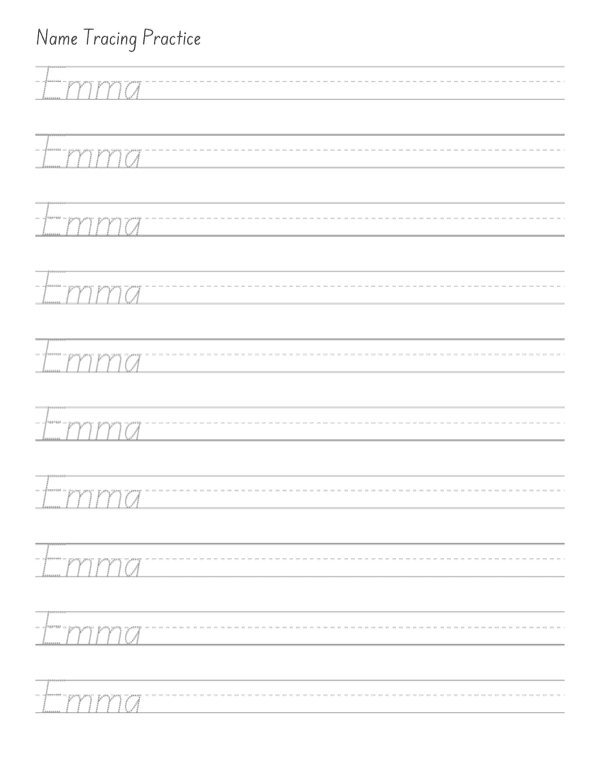
How do I make a name tracing worksheet?
- Type the name. Enter the child's name — first name, or first and last, up to 25 characters.
- Choose a style. Print or cursive lettering, dotted or light-gray tracing letters, and 1-10 practice rows.
- Generate and print. Click Generate for an instant PDF with embedded school fonts on ruled three-line guides, sized for US Letter.
That's the whole flow — there is no account to create and no editable PDF to fight with in Adobe Reader. The worksheet is built fresh from the name you typed, with the fonts embedded in the file, so it prints the same on every computer and every printer.
Why use a name tracing worksheet generator instead of a printable pack?
Ready-made tracing packs are built around the alphabet, but a child is not motivated by the alphabet — they are motivated by their own name. It is the first word most children ever want to write: it labels their cubby, their artwork, their backpack. A generator makes the worksheet about exactly those letters, in exactly that order, rather than hoping a generic A-to-Z pack eventually covers them.
There is a practical reason too. Every classroom list has an Emma and a Mary-Jane and a José, and static packs rarely handle hyphens, apostrophes or accents. This generator does: names that dotted letters cannot render switch automatically to light-gray tracing so the sheet is always complete and correct — no missing squares where a letter should be.
Why should kids learn to write their name first?
Name writing is one of the strongest early-literacy signals researchers track. A child who can write their name has quietly learned a bundle of skills at once: that print carries meaning, that letters have shapes and an order, that writing flows left to right, and that their hand can control a pencil well enough to make it all happen. Kindergarten teachers often ask for it on day one for good reason — it is the handshake between a child and written language.
Tracing is the friendliest on-ramp. The letter shapes are already there; the child only has to follow them. Ten minutes with a tracing sheet a few times a week is usually plenty — short, frequent, and low-pressure beats a long frustrating session every time.
What do the three lines on the worksheet mean?
The sheets use standard three-line handwriting guides: a solid top line, a dashed middle line, and a solid baseline. Tall letters like E and M reach the top line, small letters like m and a live between the dashed line and the baseline, and tails like the one in J hang below. Practicing on real guides from the start builds the size and proportion habits that plain blank paper never teaches.
The guides are printed in light gray on purpose: dark enough to follow, light enough that the child's own pencil work stands out — and everything stays readable on a plain black-and-white printout.
What font style should I pick for name tracing?
Print (manuscript)is the right default for preschool and kindergarten: simple upright letters close to what children see in books and classrooms. Our print font is an open-licensed school handwriting font in the same spirit as D'Nealian-style and Zaner-Bloser-style teaching fonts used in US classrooms.
Dotted letters are the classic trace-over style — great for the very first attempts because the dots literally show the path. Light-gray letters are a step up: the full letter shape is there, but the child writes over a ghost of it rather than connecting dots. A common progression is dotted first, then gray, then copying the name freehand on the empty guide lines.
Cursive suits older children (typically grade 2-3 and up) practicing a joined hand — handy for signature-style name practice too.
How can I make name practice more fun?
- Rainbow writing — trace the same row several times in different colored pencils.
- Fewer rows, more days — three rows a day beats ten rows once a week; generate a fresh sheet each time.
- Trace the family — siblings, pets, grandparents: every name is one click away, and familiar names keep the novelty up.
- Laminate one — slip a sheet into a plastic pouch and use a dry-erase marker for endless reuse.
- Mix the styles — dotted on Monday, gray on Wednesday, freehand by Friday.
Can older kids use these worksheets too?
Definitely. Switch to cursive and the same generator becomes a signature-practice tool for older elementary kids. Light-gray tracing in print style also works well for children who need extra handwriting repetition — including occupational-therapy practice — without the "babyish" look of jumbo dotted letters. Since you control the rows and the words, you control the difficulty.
When should a child start tracing their name?
Most children are ready somewhere between ages 3 and 5 — after they can hold a crayon with some control and show interest in letters, and usually after they can trace simple lines and shapes. Interest matters more than age: a three-year-old who keeps asking "what does my name say?" is readier than a five-year-old who is not curious yet. Start with just the first name in large letters and a couple of rows; add the last name and more rows as control improves.
If full letters are still frustrating, step back to pre-writing practice — straight lines, curves, circles — and return to name tracing in a few weeks. The generator's one-row option with big letters is a gentle re-entry point.
How do teachers use name tracing worksheets in the classroom?
A common back-to-school routine is a personalized tracing sheet on each desk during the first weeks — it doubles as a name tag and as morning fine-motor work. Because this generator is free and instant, making a sheet for every student on the roster takes a few minutes: type each name, print, done. Many teachers keep a laminated copy of each child's sheet in a writing center with dry-erase markers, and send a fresh paper copy home for practice — the same worksheet works in both places.
For handwriting rotations, mix the styles: dotted sheets for students still learning letter formation, light-gray for those building fluency, and blank guide rows (trace the first row, copy on the rest) as the exit ticket.
Name tracing FAQ
Are these name tracing worksheets really free?
Yes. Type a name, pick a style, and download the PDF — no account, no email, no watermark. The free generator makes single sheets; a full personalized name workbook is the paid product we are building.
Can I make name tracing worksheets with dotted letters?
Yes — choose the Dotted letter style for classic dot-trace letters on three-line writing guides. Dotted covers the letters A–Z; names with accents, hyphens or apostrophes (José, Mary-Jane, O'Brien) automatically use light-gray tracing letters instead, so every character always prints correctly.
Is there a cursive name tracing option?
Yes. Switch the style to Cursive to practice the name in a modern school cursive with light-gray tracing letters. Print style offers both dotted and gray letters.
What paper size do the worksheets print on?
US Letter (8.5 × 11 in), in plain black and white. Guide lines and tracing letters are light gray so they are easy to write over and cheap to print.
How many rows of the name fit on one sheet?
You choose 1 to 10 rows. The generator sizes the letters automatically so the name always fits the page width — long names get slightly smaller letters, short names get big friendly ones.
Can I use two or three words, like a first and last name?
Yes, up to three words and 25 characters total. If a name is too long for the rows you picked, you get a clear message to shorten it or reduce rows — never a broken worksheet.
Want a whole book of their name?
We're building personalized name workbooks — dozens of pages of one child's name across styles and sizes, ready to print as a keepsake practice book. The single-sheet generator above stays free.
More free generators
Keep the practice going with our other free printable tools:
- Free Spelling Worksheet Generator — Paste any word list and generate printable spelling practice worksheets — five activity styles plus an answer key.
- Free Handwriting Paper Generator (PDF) — Print blank handwriting paper your way — three-line guides or single lines, spacing preset by grade, optional name and date header.
- Free Multiplication Chart Printable (PDF) — Print multiplication charts from 1-10 to 1-20 — filled for reference or blank for practice, with an optional highlight on the square facts.
- Free Alphabet Chart Printable (PDF) — Print alphabet charts your way — uppercase, lowercase or Aa pairs, with optional 1-26 numbers, filled for reference or blank with writing guides.